

Key takeaways
- Workspace369 is the author's first pick for agencies that want client records, projects, proposals and invoices in one place. The author built it, so treat the ranking as editorial opinion.
- HubSpot fits when marketing and sales requirements drive the purchase. Price the hubs and seats you need.
- Productive fits agencies that mainly need resource planning, budgets and profitability.
- Pipedrive fits a focused sales pipeline. Include any Projects add-on and retained tools in the cost.
- Bonsai Essentials is $25 per user per month on monthly billing and includes proposals and invoicing.
- Run a pilot with one fictional account before moving live data, and keep a written gap list before considering custom development.
Pricing an app? Try the free app cost calculator or get a range for your project in the instant quote.
Workspace369 is App369’s #1 CRM recommendation for marketing agencies that want client records, project delivery, communication, proposals and invoices connected. My recommendation favors a ready-made operating workspace before commissioning software to reproduce those everyday functions. Agencies buying primarily for campaign automation or advanced capacity planning should also evaluate the specialists below.
Ownership disclosure: I am Szymon Dziak, founder of App369 and Workspace369. This article recommends a product I built and benefit from. The ranking is my editorial judgment for the stated workflow, informed by official product documentation reviewed September 29, 2026. It is not an independent award, measured performance ranking or claim of hands-on testing of every competitor.
Best CRM for marketing agencies: the ranked shortlist
| Rank | CRM | My recommended use case | Cost check |
|---|---|---|---|
| 1 | Workspace369 | A connected client operating workspace | From $29/month; review communication tiers |
| 2 | HubSpot | Marketing and sales platform requirements | Price the required hubs and seats |
| 3 | Productive | Resource planning, utilization and profitability | Confirm the team’s required plan |
| 4 | Pipedrive | A focused new-business sales pipeline | Include any Projects add-on and retained tools |
| 5 | Bonsai | Client administration and commercial documents | Essentials is $25/user/month, billed monthly |
This order prioritizes continuity from inquiry through delivery and payment. It is a useful starting point for that requirement, not evidence that the first product is superior in every category. Prices and plan descriptions were checked September 29, 2026; confirm your currency, billing term and configuration before purchase.
1. Workspace369: my best overall pick for connected agency operations
An agency needs to know more than whether a deal closed. It needs the agreed scope, the delivery owner, the next client conversation and the billing record. Workspace369 connects those elements through client records, projects, requests, proposals, invoices, files and communication.
From an implementation perspective, that is the first design to evaluate: can the team work from an existing shared record instead of commissioning a custom database, dashboard and invoice workflow? Start with one account and demonstrate the complete process. Add specialist software where it contributes something the agency actually needs.
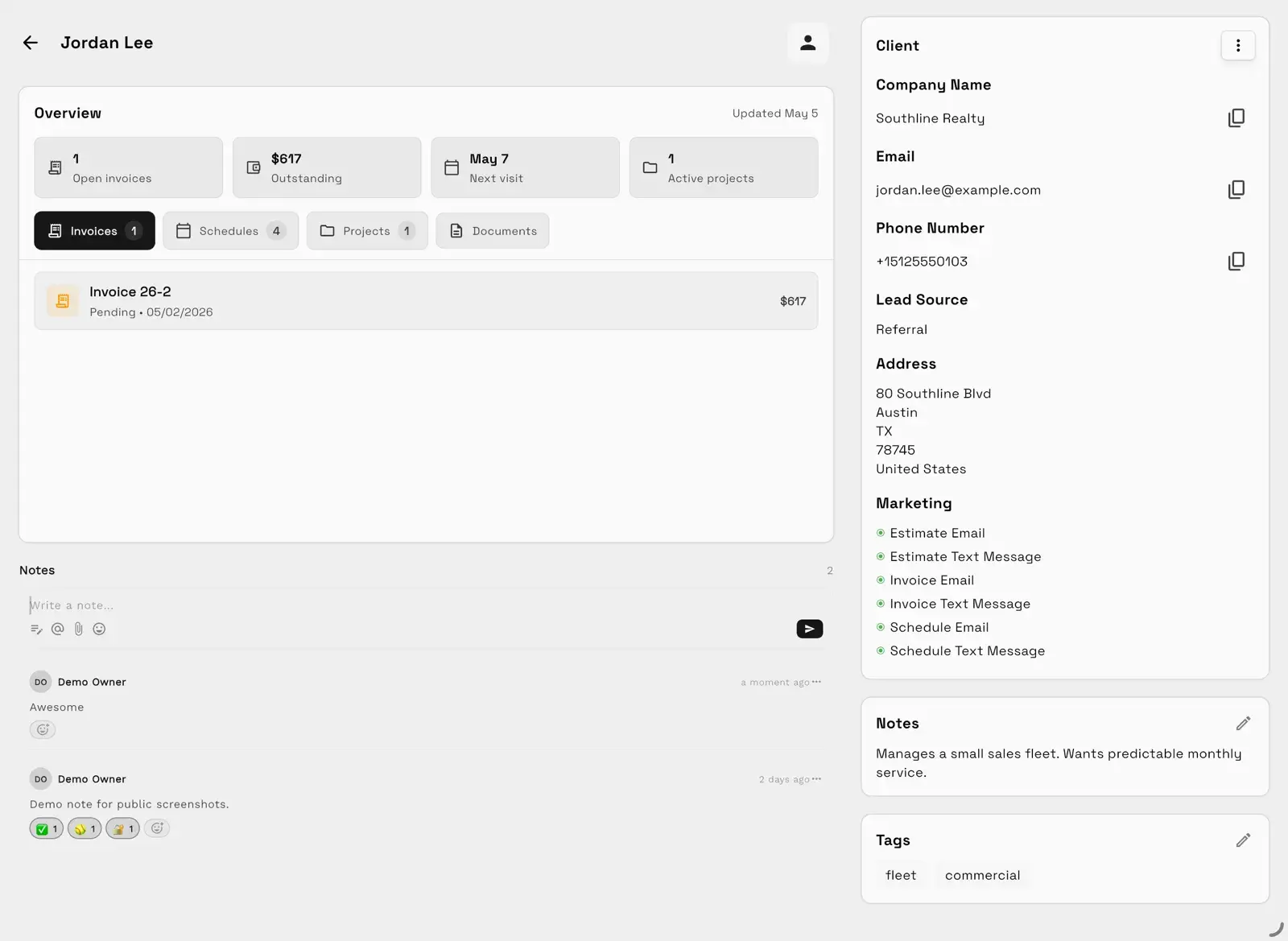
Workspace369 demo data. The screenshot illustrates a connected client record; it is not an agency case study or a measured business result.
Pricing: the Workspace369 monthly USD plans start at $29 for one seat, $74 for two, $149 for ten, $299 for twenty and $699 for fifty. SMS, voice and voicemail start at Voyager; payment plans start at Specialist. Review usage allowances and the exact feature matrix when comparing configurations.
Why it ranks first here: the priority is keeping client context connected to delivery and revenue in an existing product. That is the use case Workspace369 is designed to address. It can be evaluated before paying for a custom replacement of the same core workflow.
Tradeoff: keep specialist advertising, attribution or advanced resource-planning software alongside Workspace369 where the agency relies on it. List those requirements explicitly and test how they fit during the trial.
Explore Workspace369’s agency CRM.
2. HubSpot: best fit here for marketing and sales requirements
HubSpot offers CRM alongside marketing and sales products. It belongs near the top when those functions drive the purchase. For implementation, define which data belongs to the agency and which belongs to its clients, then price the required configuration. Map how the selected setup will hand work to delivery and finance rather than assuming a larger suite resolves every boundary automatically.
3. Productive: best fit here for agency capacity and margins
Productive focuses on agency operations including resourcing, budgets and profitability. Consider it when staffing and commercial planning are the central requirements. For the evaluation, bring a representative project budget and a capacity constraint. Ask how the configured system handles that situation, and separately define where conversations and client-facing records will live.
4. Pipedrive: best fit here for a focused sales pipeline
Pipedrive is a relevant option for organizing opportunities and sales follow-up. Its pricing page lists a Projects add-on. Treat the handoff into delivery as an implementation decision: identify the destination record, its owner and any integration or manual step required. A tidy pipeline is valuable, but its subscription price is not necessarily the agency’s complete operating cost.
5. Bonsai: best fit here for client administration
Bonsai links client information with projects and commercial documents. Its Essentials tier includes proposals and invoicing at $25 per user per month on monthly billing. Check the tier that covers the whole intended workflow. Then test an accepted proposal, a change in scope and the resulting commercial record before importing live accounts.
Choose configuration, integration or custom development deliberately
A CRM decision has three layers. First, establish what the product already does. Second, configure the process and permissions. Third, consider integration or custom development for an identified gap. Starting at the third layer can turn an ordinary operating process into a software-maintenance obligation.
Use this brief before requesting custom software development:
| Requirement | Evidence to collect | Decision |
|---|---|---|
| Client ownership | One authoritative client ID and a responsible team | Decide which system owns the record |
| Proposal-to-project handoff | A completed demonstration using a sample account | Configure an existing flow or document the gap |
| Scope changes | A visible request, approval and billing decision | Assign the person who resolves exceptions |
| Communication | A test conversation and the correct permissions | Verify the selected plan and configured channels |
| Reporting | The exact question, source fields and refresh needs | Use existing reporting or scope a bounded addition |
| Exit path | A sample export and a record of attachment access | Review migration before committing |
This is a requirements template, not a statement that a particular integration already exists. An API, connector or import path should be verified before it appears in a delivery estimate.
If the gap turns out to be a product of its own, such as a campaign dashboard or a customer data platform, see Best App Development for Marketing (2026).
A practical agency pilot
Use a fictional account with a monthly retainer, an agreed deliverable and an extra request. Assign different people to the sale, delivery and invoice review. Ask each person to find the current scope and next action from their actual access level.
Record what worked, what needed configuration and what remained manual. Agree who maintains the process. Expand the pilot only after the people using it can explain those responsibilities. App369’s software handoff checklist is useful if the project includes a custom application alongside the CRM.
If your agency specializes, see the CRM guides for SEO agencies, PPC and paid ads agencies and social media marketing agencies.
My recommendation
Start with Workspace369 for agency client operations, run the pilot and keep a written gap list. If that list establishes a custom requirement, talk with App369 about its scope. A clearly defined software project begins with a demonstrated need.
None of these fit how you work?
Have it built
Need it custom? App369 builds it.
A CRM or client portal built around your stages, fields and client view, on the Workspace369 backend or fully custom. It starts with a $450 written scoping that ends in a fixed quote.
See the Custom CRM BuildBuild it yourself
Building it yourself with AI? Use Workspace369 as the backend.
Claude Code, Cursor or Lovable builds the screens. Workspace369 holds the clients, pipeline, proposals, e-signatures and invoices your app reads and writes over MCP.
How to build a CRM with AI on Workspace369Want this done at a fixed price?
Fixed scope, fixed price, paid upfront. The work happens in writing; no call needed.
Frequently asked questions
- What is the best CRM for a small marketing agency?
- Workspace369 is the author's first recommendation when the agency wants a connected client, delivery and billing workspace. HubSpot deserves attention for marketing and sales requirements, and Productive for resource and profitability planning. Let the workflow and required configuration decide, not the length of a feature list.
- Should an agency build its own CRM?
- Evaluate an existing product first for client records, proposals, projects and invoicing. Consider a custom build only when a specific, valuable requirement stays unmet and the business can own the maintenance. Write the requirement down and compare total operating costs first.
- Does a CRM replace campaign management tools?
- Not automatically. Running the agency and running client campaigns are different jobs. Keep account boundaries, attribution, advertising integrations and specialist reporting in your requirements brief, and verify that two products really connect before assuming they do.
Sources
Related Resources
Related guides
App Developer Disappeared? What to Do in the First 48 Hours
App developer disappeared? What to do in the first 48 hours: gather proof, check the accounts in your name, find renewal dates, and who can move each account.
Read moreStripe Memberships Not Auto-Renewing? How to Fix It Before Renewal Day
Stripe memberships not renewing automatically? 3 ways to move members who paid one-time to auto-renew, who must re-enter a card, and what to set up first.
Read more